
Gacha World Guide for Beginners. How to start in Gacha World?
Gacha World is a highly recommended game for several reasons, one of the main ones is that it is a free to win game, which means that it is not necessary to pay real money to advance in the game. The tutorial of Gacha World is very complete, but perhaps it is also a bit overwhelming, too much information, menus... Therefore we bring you this Gacha World Guide with which you will know everything you need to start playing.
➡️ Gacha World Guide: Main Menu
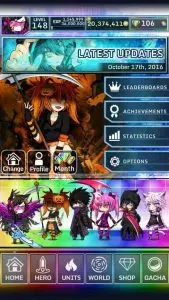
The main menu is located at the top left of the screen, in which appears the face of your avatar or hero, in which when we click it will give us the information of your statistics, such as: gold, level, gems.... Selecting each of these options will take us to the store or place where we can spend these resources.
In addition to the News that appear in the big banner at the beginning of the screen, we will have two additional sections, called Change and Profile. In the Change section we will have the option to choose between the different characters and in the Profile section we will be able to customize our background, poses, change your name...
We will have another section in the main menu called Leaderboards, where we will be able to consult the table of best players, or players with better ranking? it will give us very interesting statistics like the number of fights, gems, victories in arena...
 The Options button will allow you to change the background music, sound effects, access the lag reduction option... We also have another aspect to take into account which is your Arena Profile, where we will be able to access all your Arena statistics.
Data transfer, is another tool that offers us the options section where we can export data when we change phone or device, or even google or apple account.
Redeem Promos is a reward redemption system in which you can redeem all the promotional codes you have obtained, which usually benefit you with gems that you can use in Gacha World itself.
Finally we come to the last two options, Credits where we can obviously see the collaborators, developers and managers both individuals and companies working in Gacha World. And Reset Data where we will be able to erase all the data of our game in order to be able to start it again.
The Options button will allow you to change the background music, sound effects, access the lag reduction option... We also have another aspect to take into account which is your Arena Profile, where we will be able to access all your Arena statistics.
Data transfer, is another tool that offers us the options section where we can export data when we change phone or device, or even google or apple account.
Redeem Promos is a reward redemption system in which you can redeem all the promotional codes you have obtained, which usually benefit you with gems that you can use in Gacha World itself.
Finally we come to the last two options, Credits where we can obviously see the collaborators, developers and managers both individuals and companies working in Gacha World. And Reset Data where we will be able to erase all the data of our game in order to be able to start it again.
👉Hero menu
- Fashion: select the different outfits for your characters.
- Customize: customize the visual aspect of your characters.
- Stats: decide how to distribute your experience points to your characters so that you can best adapt to your play style.
👉Units menu
- Units selection: choose the units you want to add to your lobby or replace the ones already selected.
- Units information: contains all the information about the units you have.
- Awaken: contains the about button in which you have all the information you may need.
 👉World Menu
- Story: Play the main mode of the game, in which you will go through worlds where you will earn gems.
- Events: farm money, gems, experience, tickets and all the components from this section.
- Arena: earn gems by facing all kinds of enemies as you rank up.
- Bosses: visit each and every boss you have won in the story mode and fight them again.
- Towers: you have 100 floors of enemies with 15 waves of enemies every 5 floors, your goal is to reach the end.
👉Store Menu
- Gem Shop: in case you want to buy gems, this is where you can do it and check the available offers.
- Fashion Shop: buy any clothing or artifact that can change the look of your character.
- Upgrades store: remember to buy here your life and attack upgrades, which you will get according to your level.
👉Gacha Menu
- Gacha: Section similar to rate up, but with less possibilities to get related units.
- Ticket: spend your 5 or 6 star tickets to secure a 5 or 6 star character.
- Rate up: spend the gems you have earned to get new units.
We hope you found this Gacha World Guide helpful to start your adventure.